Important Note: These brackets for only for the front calipers. The rear Akebono calipers are plug-n-play but only for the 04+ Maximas/ 05+ SE-R Altimas.
Four M14x45mm long bolts (Note: these bolts will stick out beyond the adapter to mount M14x1.5mm nuts if desired [recommended].)
Four M14x55mm long bolts
Four washers (if nuts are being used with the kit)
A pair of Grade 6 aluminum calipers
Tools you will need:
22MM sized socket or wrench
A fine file or fine burr drill bit (if modification required)
Torque wrench
STEP 1
Due to casting variation of the Akebono calipers, some slight modification may be required to the adapter in order for it to clear the body of the caliper.
Using your 55mm long bolts, thread the adapters to your Akebono caliper until seated. The adapter is mounted to the caliper with the bottom of the “L” shape of the adapter oriented to towards the bleeder while the machined notch sits towards the caliper.
Verify that the notched portion clears the body of the caliper. If it does not, mark the area of contact and remove the appropriate amount of material until cleared. (Take away about 1-2mm of material at a time at approximately a 45-degree angle to match the caliper body angle. Re-mount to verify clearance. Repeat if necessary).
STEP 2
Mount your adapter to your spindle. The adapter sits outside of the spindle mounting holes while the 45mm long bolts mount from the inside of the spindle towards the body of the car. Hand thread one 45mm long bolt by only a couple of rotations. Take your other 45mm bolt and repeat for the other mounting point while extending the adapter away from the spindle. This will allow for extra pitch and play to align your second bolt to the threads of the adapter.
STEP 3
Once both bolts are comfortably thread-started into the adapter, fully thread both bolts through and tighten to OEM specifications.
NOTE: DO NOT FORCE BOLTS ONTO STARTING THREADS OF THE ADAPTER! This may result in damage or cross-threading to the aluminum adapter.
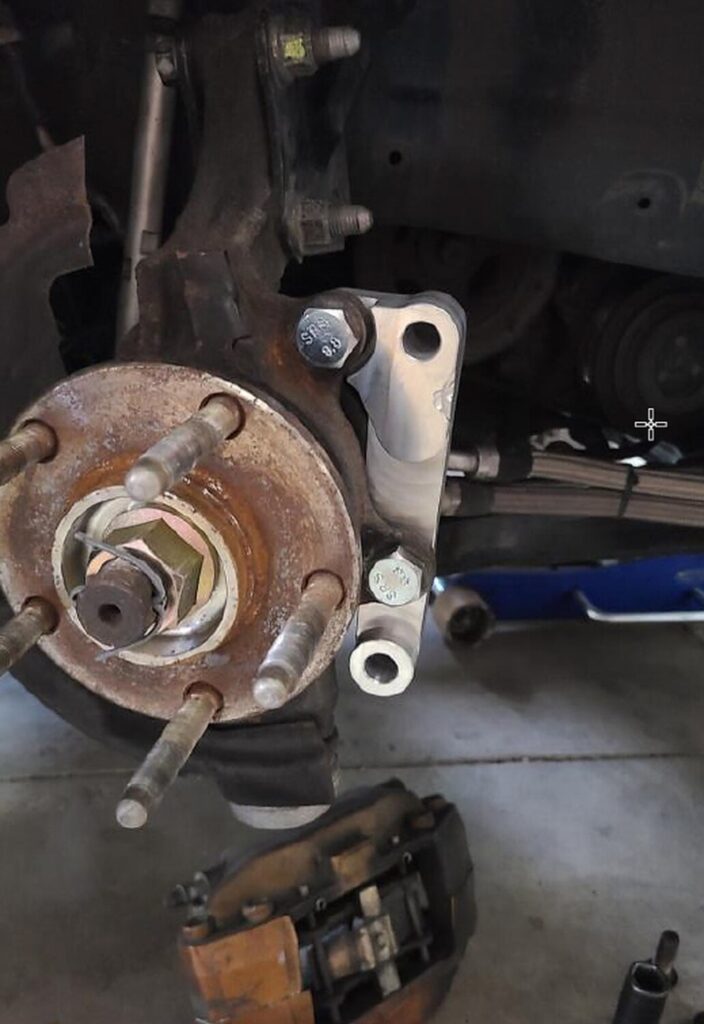
Your bracket will look like this mounted to the vehicle:
STEP 4
Repeat all steps to the opposite side of your car. Mount your Akebono calipers using the supplied 55mm long bolts. Tighten to OEM specifications. NOTE: Part of the dust shield will need to be trimmed in order for the caliper to be mounted. Use metal shears or a cut-off wheel with the appropriate tool to complete this step.
STEP 5
Double-check all fasteners for tightness prior to driving your vehicle. Test drive and enjoy!
*** This kit is to be used for off-road use only. No warranty is implied or expressed. Purchaser assumes all liability. Tighten all fasteners to OEM specifications. ***
I just installed these aluminum valve covers on my 5thgen Maxima. AND YES, THEY ARE ALUMINUM! The brand is MITZONE. They are well-made and come with gaskets. I have no leaks or problems so far. They are also very sturdy/solid vs. the crap plastic stuff. Highly recommend.
eBay Description: ALUMINUM Valve Cover Kit for 02-09 NISSAN Altima Maxima Murano Quest I35 3.5L Price: $87.99-$95.00 (Shipped)
Order Links Below:
Price: $189.99 (Shipped Anywhere in the Continental US)
Applications
2009 – 2016 Nissan Maxima
2007 – 2016 Nissan Altima
2007 – 2013 Nissan Altima Coupe
Tune On The Go is proud to present phenolic its 2pc thermal intake spacers. These spacers are made from 3/8 thick high-grade phenolic. The spacers will isolate the throttle body from the manifold and also the manifold from the block.
With the isolated areas spaced off this way the manifold will run about 23 degrees cooler thus creating colder, denser, heavier air into the chamber
Sold as a complete kit which includes:
2 – Extended High Strength Manifold Studs
4 – Stainless Steel Manifold Bolts
8 – Stainless Steel Lock Washers
4 – Stainless Steel Allen Head Throttle Body Bolts
These brackets will guarantee the proper fitment of Akebono calipers on your Maxima or Altima. Say goodbye to pad overhang and knocking off wheel weights when running your 18s!
The kits will be made out of 6061 high-strength aluminum. I am currently in talks with the machinist to see if I can do a separate run of steel brackets though. I was quoted $45 USD more (subject to change).
The aluminum kits will cost $225 plus shipping and PayPal fees. ($50.00 Deposit Required)
Important Note: These brackets for only for the front calipers. The rear Akebono calipers are plug-n-play but only for the 04+ Maximas/ 05+ SE-R Altimas.
Improvements (Over Previous Brackets):
Mounting holes to the knuckles have been shifted to the correct spots to fix the pad overhang problem.
A notch has been made to clear the curvature of the caliper as it was not allowing it to seat on the bracket properly.
The caliper mounting holes were oversized. This is also corrected.
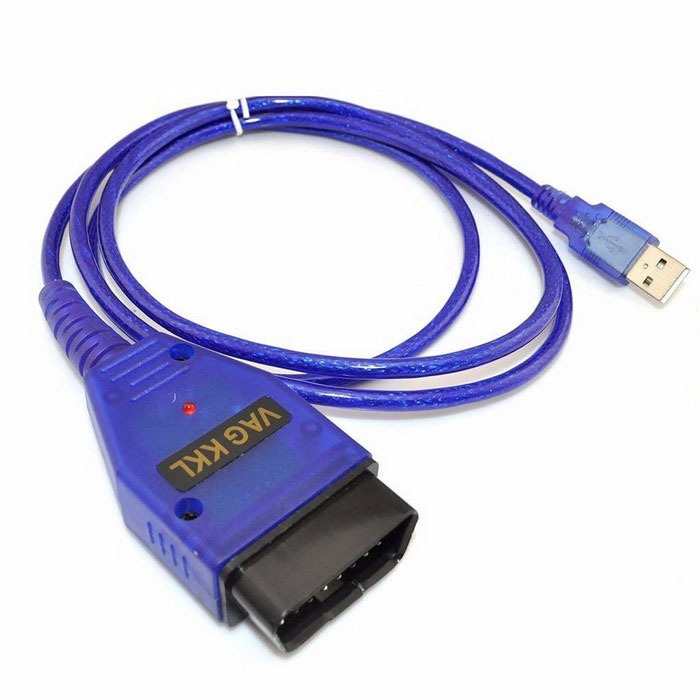
If you are DIY person and love working on your Nissan Maxima, then this tool is a MUST HAVE! When you go to the Nissan dealer, the person working on your car typically uses a tool called a Nissan Consult. The Nissan Consult that the dealer uses costs thousand of dollars and is only available to dealers. By using the Nissan DataScan software, a laptop and a generic VAG COM OBDII adapter you can achieve just about the same level of on-board diagnosis that $5,000 Nissan Consult provides.This software allows you to:
Check CEL codes
Check/Reset ABS and SRS-Airbag Faults
Check/Reset TCM Codes
Adjust timing
Perform Idle Air Relearn
Reset ECU learned settings
Data-log
Program keys
Check Emissions Readiness Monitors
Active Test temporary modify some of the engine parameters for testing purposes
And Much much more….
The software itself costs $55.00 and generic cable costs around $7.00-$8.00.
You can find the cables on eBay between $12.00-$20.00 shipped. It ranges based on location and shipping. Search for the following keywords on eBay and you will find it: “KKL 409.1 VAG-COM OBD2 USB Cable”
Below are all the functions it provides:
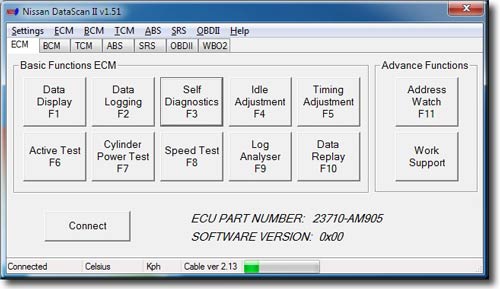
ECU Part Number
This is the main window of the NDSII software which shows the ECM Nissan Identification part number. Basic and Advance Functions can be selected by clicking on the buttons, using the shortcut keys (F1 – F11) or using the Menu bar. Most functions except Data Replay and Log Analyser are disabled until communication with the ECU is successfully established.
Progress bar at the bottom indicates communication between the ECU and PC. If the bar is not moving there is no data being received from the ECU.
Data Display Settings
This window is used to assign parameters to be displayed by the Data Display function. Only parameters that are supported by the currently connected ECU are available for selection. Gauges are counted from left to right, top to bottom. Multiple gauges can monitor the same parameter.
Data Logging ECM
Selected parameters can be logged to a file. This function can also be accessed from the Data Display window. The data log file can be analysed using the Data Replay or Log Analyser functions.
Self Diagnostics ECM
Self Diagnostics function allows users to read and reset engine ECU error codes.
Idle Adjustment
Idle Adjustment function allows users to adjust the base idle RPM. The setting is saved to the ECU and it does not reset with engine restart.
Timing Adjustment
Timing Adjustment function allows users to adjust the base ignition timing. The setting is saved to the ECU and it does not reset with engine restart.
Active Test ECM
Active Test allows users to temporary modify some of the engine parameters for testing purposes. They return to their original values when a function is stopped, PC disconnected or engine restarted.
Note: It is possible to damage the engine if the A/F Base % functions is used to excessively modify fuel delivery. Likewise the engine may overheat if the Engine Temperature is set to low for a long period of time. Do not use those functions if you are not sure how they will effect your engine.
Work Support
Work Support functions allow users to perform some of the advance service procedures. Those procedures may need to be performed after replacement parts are installed.
Clear Self Learn – clears the A/F Base SL map learned by the ECU.
Idle Air Volume Learn – is an operation to learn the fully closed position of the throttle valve.
Program Immobiliser Key – allows to register the Nissan transponder keys with the Immobiliser Note: The immobiliser security PIN CODE needs to be known. Initially all registered keys will be erased and all keys will need to be reregistered.
Cylinder Power Test
Cylinder Power Test function can be used to identify cylinder that is under performing. This function allows shutting down individual cylinders. If all of the cylinders are producing the same amount of power the engine RPMs will drop exactly the same amount on each cylinder that is cancelled.
Log Analyser is used to review log files previously generated by with Data Logging function. Graphs are drawn by selecting boxes next to parameter value. Graph colours match the parameter value colours.
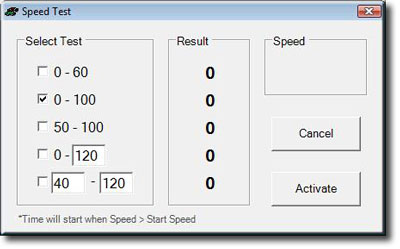
Speed Test
Speed Test is a unique function for measuring car’s acceleration performance. Predefined or user specific tests can be used. Due to the low resolution of Nissan speed sensors, measurements should only be used as a guide and not a true reflection of car’s performance.
Note: This function should not be used while driving on public roads.
Address Watch
Address Watch function is used for monitor specific ECU memory addresses. By monitoring a memory address extra information can be retrieved that is not normally available using Consult II protocol. A knock sensor reading can be obtain using this method if knock sensor memory address is known.
Wideband O2 sensor
Nissan DataScan II also supports wideband Air/Fuel ratio meters from Innovate Motorsports. A second serial port is used to connect to the controller and collect data.
The data from the wideband meter can be displayed or logged in conjunction with other engine parameters using the Data Logging function.
ECU Part Number BCM
The BCM tab shows the BCM Nissan Identification part number. Basic Functions can be selected by clicking on the buttons or using the Menu bar. All functions are disabled until communication with the ECU is successfully established.
Progress bar at the bottom indicates data being send between the ECU and PC. If the bar is not moving there is no data being received from the ECU.
Note: Some vehicles may use K line for diagnostics of engine ECU (ECM) but still use DDL1 line for diagnostics of other control modules. This software does not support diagnostics over the DDL1 line. Some of those models are: X-trail, Maxima, Patrol.
Self Diagnostics BCM
Self Diagnostics function allows users to read and reset BCM error codes.
Active Test BCM
Active Test allows users to temporally activate some of the functions of the BCM. This is usually used to manually test the functionality of the systems controlled by the BCM.
Note: Functions not supported by the BCM are disabled (grayed out).
ECU Part Number TCM
The TCM tab shows the TCM Nissan Identification part number. Basic Functions can be selected by clicking on the buttons or using the Menu bar. Most functions except Data Replay and Log Analyser are disabled until communication with the ECU is successfully established.
Progress bar at the bottom indicates data being send between the ECU and PC. If the bar is not moving there is no data being received from the ECU.
Note: Some vehicles may use K line for diagnostics of engine ECU (ECM) but still use DDL1 line for diagnostics of other control modules. This software does not support diagnostics over the DDL1 line. Some of those models are: X-trail, Maxima, Patrol.
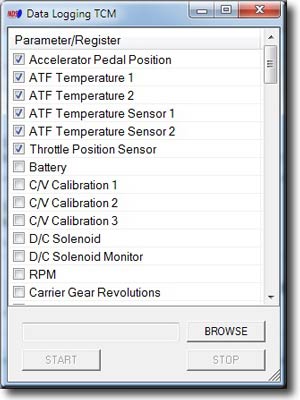
Data Logging TCM
Selected parameters can be logged to a file. This function can also be accessed from the Data Display window so the data can be logged while it is displayed. The data log file can be analysed using the Data Replay or Data Analyser functions.
Self Diagnostics TCM
Self Diagnostics function allows users to read and reset TCM error codes.
ECU Part Number ABS
The ABS tab shows the ABS Nissan Identification part number. Basic Functions can be selected by clicking on the buttons or using the Menu bar. Most functions except Data Replay and Log Analyser are disabled until communication with the ECU is successfully established.
Progress bar at the bottom indicates data being send between the ECU and PC. If the bar is not moving there is no data being received from the ECU.
Note: Some vehicles may use K line for diagnostics of engine ECU (ECM) but still use DDL1 line for diagnostics of other control modules. This software does not support diagnostics over the DDL1 line. Some of those models are: X-trail, Maxima, Patrol.
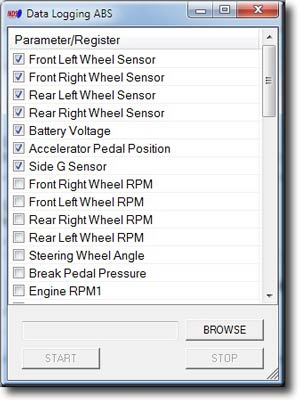
Data Logging ABS
Selected parameters can be logged to a file. This function can also be accessed from the Data Display window so the data can be logged while it is displayed. The data log file can be analysed using the Data Replay or Data Analyser functions.
Self Diagnostics ABS
Self Diagnostics function allows users to read and reset ABS error codes.
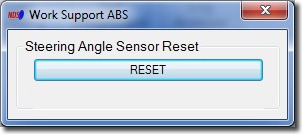
Work Support ABS
Work Support functions allow users to perform advance service procedures. Those procedures may need to be performed after replacing parts.
Steering Angle Sensor Reset – After removing/installing or replacing VDC/TCS/ABS control unit, steering angle sensor, steering components, suspension components, and tires, or after adjusting wheel alignment, make sure to adjust neutral position of steering angle sensor before running vehicle.
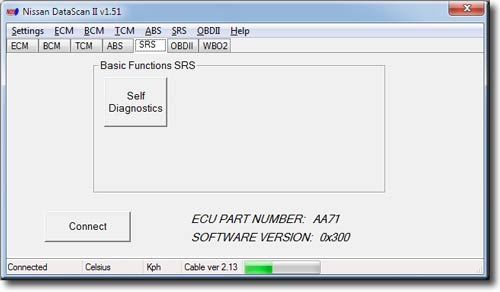
ECU Part Number SRS
The SRS tab shows the SRS Nissan Identification part number. Basic Functions can be selected by clicking on the buttons or using the Menu bar. All functions are disabled until communication with the ECU is successfully established.
Progress bar at the bottom indicates data being send between the ECU and PC. If the bar is not moving there is no data being received from the ECU.
Note: Some vehicles may use K line for diagnostics of engine ECU (ECM) but still use DDL1 line for diagnostics of other control modules. This software does not support diagnostics over the DDL1 line. Some of those models are: X-trail, Maxima, Patrol.
Self Diagnostics SRS
Self Diagnostics function allows users to read and reset SRS error codes.
Note: Recorded faults are historical and can not be cleared.
Work Support
Work Support functions allow users to perform the advance service procedures. Those procedures may need to be performed after replacement parts are installed.
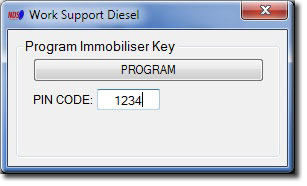
Program Immobiliser Key – allows to register the Nissan transponder keys with the Immobiliser Note: The immobiliser security PIN CODE needs to be known. Initially all registered keys will be erased and all keys will need to be reregistered.
OBDII Self Diagnostics
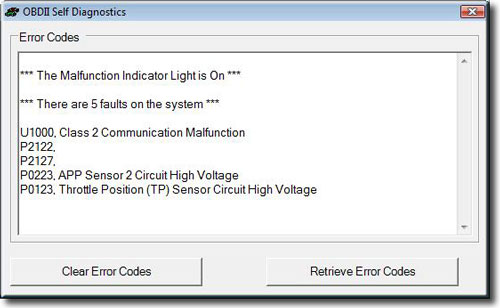
OBDII Self Diagnostics function allows users to read and reset ECU error codes.
OBDII Monitor Status
OBDII Monitor Status shows the current status of various monitoring systems used by the car’s engine management system.
OBDII Log Analyser
Log Analyser is used to review log files previously generated by with Data Logging function. Graphs are drawn by selecting boxes next to parameter value. Graph colours match the parameter value colours.
OBDII Fuel System Satus
OBDII Fuel System Status can be used to check if the car’s fuel system is running in Closed Loop mode.
Fuel systems do not normally refer to injector banks. They are intended to represent completely different fuel systems that can independently enter and exit closed loop fuel. Banks of injectors on a V-engine are generally not independent and share the same closed-loop enablement criteria.
OBDII Data Logging
Selected OBDII parameters can be logged to a file. The data log file can then be analysed using the Log Analyser function.
Due to the slow nature of OBDII protocol it’s recommended to log only the required parameters.
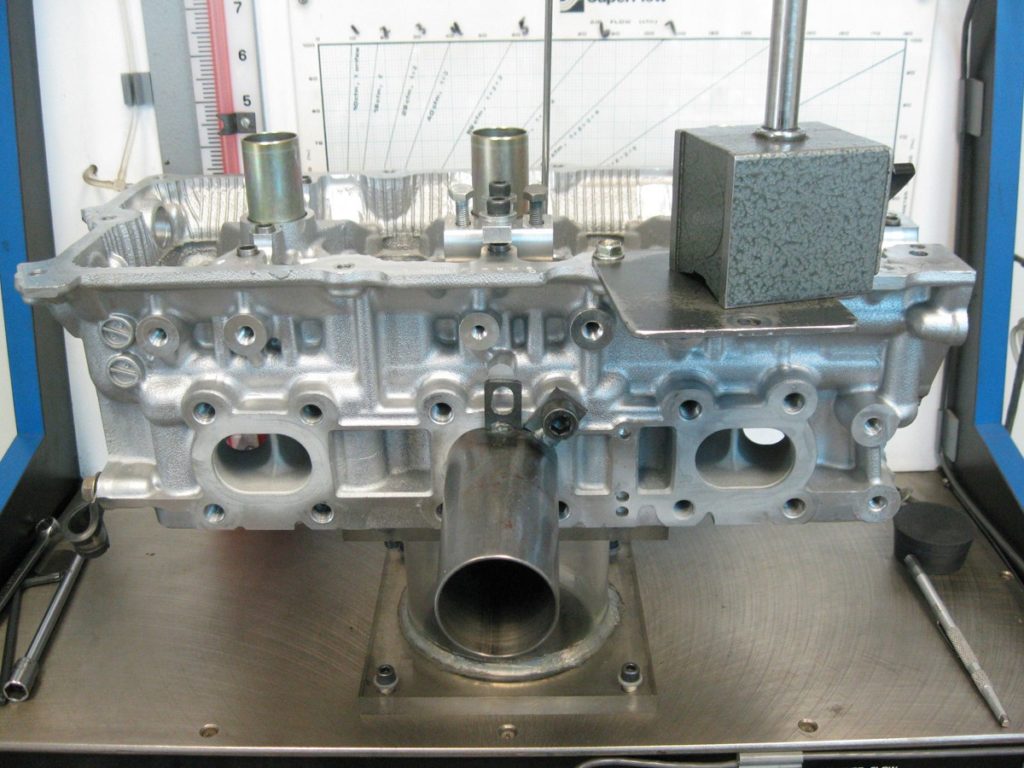
I just picked up my HR heads from Gord Bush who cleaned them up for me and flow tested them. We of course have previous numbers from the non-revup heads that I had Gord Bush port – so let’s compare! Visually looking at the HR heads you can see just how much bigger the intake port is than the non-revup heads, and the numbers prove it – the HR heads flow the same as the ported DE heads (in fact substantially more at low valve lifts). The exhaust doesn’t flow quite as well as the ported DE exhaust did, but it is still substantially better than a stock DE at high lifts.
Stock VQ35DE heads on the flow bench, very similar looking to the HR exhaust ports
Stock DE intake ports on the flow bench, substantially different than the HR
One reason the exhaust flows less at low valve lifts may be due to the fact that the HR has smaller valves. While this may be counter intuitive to those of you that go out there and buy the biggest valves you can, a smaller valve shrouds the combustion chamber less, and in-fact promotes flow at higher lifts. My imagination tells me you want the smallest valve and biggest port you can get away with, without overheating the valve.
Once these HR heads are ported, we should be able to get a decent bit more exhaust flow and hopefully crack the 400whp barrier with shorter intake runners and exhaust runners.